Your whole shift.
In one place.
Plan the roster. Keep tasks and logs with each shift. Track the hours. And when you need a hand, just ask Shiftly AI.
Built for small venues. Open to early explorers.
together at last.
For the places that make a neighbourhood.
From the first shift to the last check
One shift. Everything connected.
A clear plan for you. A clear day for your team.
The work stays together, from roster to clock-out.
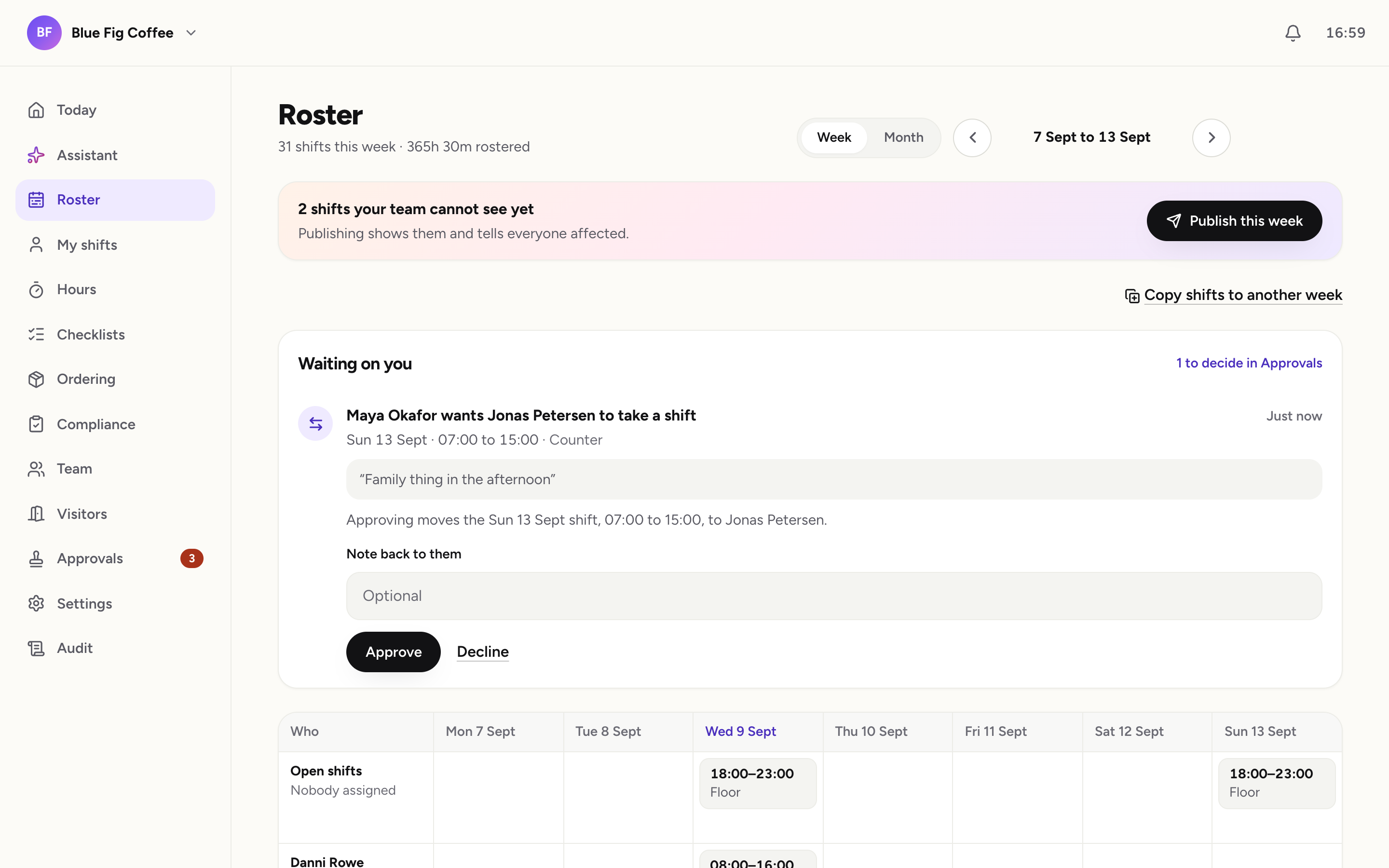
Your workspace · actual product screenshotScroll sideways to see the full screen
Publish the roster. Everyone sees their week.
Prepare shifts, check availability and publish when you are ready. Your team knows when and where they are needed.
Less to chase. More room to breathe.
The little things
make the whole day.
The opening checks. The stock order. The fridge log. Give every shift its own list, so everyone knows what needs doing.
The right tasks.
The right shift.
Opening or closing, your team sees the checklist for the shift they are working.
Interactive example · try a check
A stock check.
An order ready.
See suggested quantities from your stock levels. Submit the day’s order by category.
Illustrative example · independent shop
Checks on the shift.
Records in one place.
Keep temperatures, photos and safety checks with the work. Ready for your review.
Illustrative example · bar
A shift carries its responsibilities. Required checklist work must be resolved before clock-out.
Approving reassigns this shift to Jonas. You see the change before you decide.
Your attention, in the right place
One place for
“can you check this?”
A shift swap. A change to the hours. A log to review. See what is waiting, who is asking, and what your decision will change.
Or ask your Assistant to helpMeet your extra pair of hands
A little less clicking.
Just ask.
Prepare next week’s roster. See what needs you today. Ask Shiftly AI in plain words, and keep your attention on your venue.
 Meet Shiftly.
Your little helping hand.
Start with the week you already know.
I can copy last week’s shifts into a draft for next week, then help you check availability before you publish.
Draft shifts stay hidden from your team until published.
Try an example
Scripted product example · Prepare a roster · no live changes
Same permissions. Same actions. Same audit trail.For owners and managers. Asking is a way in, never a way around.
From clock-in to a clear record
The day is done.
The hours add up.
Clock in at the counter. Review corrections with the reason attached. Export your team’s hours into the process you already use.
Time worked, with the break taken out.
The Shiftly difference
The roster is just the start.
You need to know who’s working. And that the work gets done. Shiftly connects the two.
| Scheduling + separate toolsThe day, in pieces | Shiftly AIThe day, connected |
|---|---|
| Finishing the shiftOften a paid add-onA list to follow up on. Check the tasks separately from the hours. | Finishing the shiftBuilt into ShiftlyDone before clock-out. Required checklist items hold clock-out until complete, or a manager overrides with a reason. |
| The work in betweenMore tools to budget forAn order here. A log there. Move between your roster, stock list and daily logs. | The work in betweenBuilt into ShiftlyOne shift carries the work. Stock orders, suggested quantities and daily compliance logs live with the shift. |
| Getting things doneOften on a higher planOpen each tool. Find the action. Work through your day across separate screens. | Getting things doneBuilt into ShiftlyAsk. Review. Act. Ask the Assistant to prepare a roster or handle a request, with your permissions and an audit trail. |
| At the doorAnother system to manageA time clock. Then a visitor book. Keep another record for the people who are not on your team. | At the doorBuilt into ShiftlyOne kiosk. Two jobs. The same shared tablet handles staff PIN clock-ins and visitor or contractor sign-ins. |
An illustrative workflow comparison. Individual apps and plans vary.
A few things you might be wondering
Good questions.
Straight answers.
Owners, managers and teams at small venues: cafés, bars and independent shops. You plan the week and review the day; your team sees their shifts and the work that belongs to them.
Small venues. A new beginning.
Make room for
a warmer working day.
We’re building Shiftly AI for places like yours.
Get in early and help shape what comes next.